Edit your reelsjust by chatting.
Drop your phone clips into ReelCut, tell ChatGPT or Claude what you want, and watch the edit happen on your Mac. Free for 7 days. Nothing uploaded. No editing skills needed.
7 days free · macOS 26 · Apple silicon · Claude on any plan or ChatGPT Plus
Tap a block to see what it’s tied to.
A real ReelCut edit: three phone takes in, one reel out. Sample footage, made with AI.
Use the AI you already have.
No new AI subscription. ReelCut gives ChatGPT or Claude the hands to edit, and your Mac does the work.
Claude
Any plan, free included
In the Claude app on your Mac, or Claude Code. One click connects it.
ChatGPT
Plus or higher
Through Codex, OpenAI’s agent that comes with ChatGPT. One click connects it too.
On your phone
Claude on the web and in the app
A private link lets claude.ai reach ReelCut on your Mac, so you can edit from the sofa.
A real edit
Raw clips in. Ready-to-post reel out.
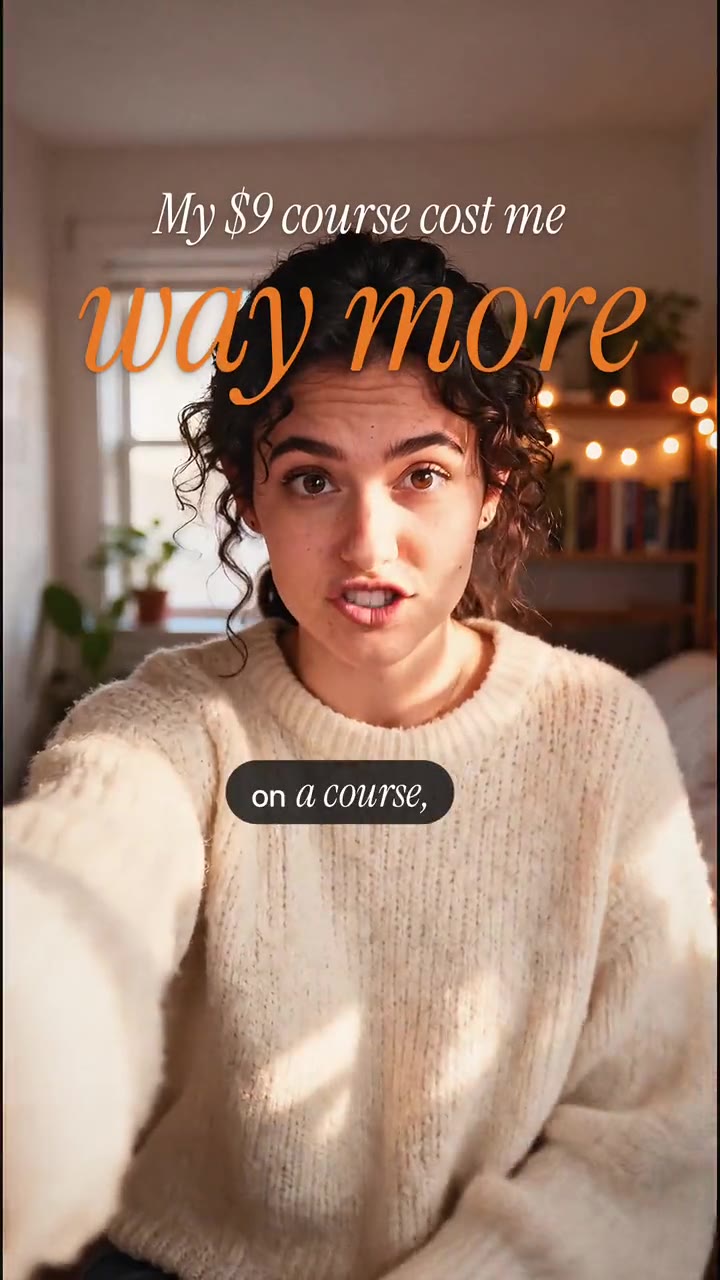
Phone footage and one message. Drag the line to see what ReelCut did, and turn the sound on to hear the difference.
From the phone
 0:06
0:06 0:08
0:08 0:08
0:08The creator asked
“make a 30 sec reel from my 3 takes in reelcut. soft and editorial”
What came back
- 22 s of takes
- a 14 s reel
- The restart
- cut, best line first
- Look
- soft editorial, in warm film
- Title
- stacked serif, line by line
- Captions
- serif, the spoken word in sans
- Course card
- in a print frame, on “way more”
- Big words
- “results first”, with a push-in
- Sound
- a cha-ching on “$9”, a whoosh on the cut
- Voice
- cleaned, levelled to −14 LUFS
- Ready to post
- 8 of 8 checks
Sample footage, made with AI. The edits are ReelCut’s, exactly as exported.
How it works
You talk. ReelCut edits.
Three steps, no editing words. ReelCut does the cutting on your Mac while ChatGPT or Claude makes the decisions.
 3 clips · transcribed on your Mac
Step 1
Film on your phone. Drop the clips in.
Film the way you already do: several takes, restarts and all. AirDrop them to your Mac or pick them from Photos, and ReelCut transcribes every word right there.
make a 30 second reel. captions that pop
start with the price
shorter
add a boom on the number
ChatGPT or Claude · edits ReelCut as you go
Step 2
Say what you want.
In ChatGPT or Claude, in your own words. It reads your transcript, picks the hook and makes the cuts. There’s no timeline to learn.
- ✓Hook in the first second
- ✓Captions clear of the buttons
- ✓Voice at −14 LUFS
- ✓Caption and hashtags
- ✓9:16, 1080 × 1920
Step 3
Watch it, nudge it, post it.
The edit plays in ReelCut the moment it’s made. Fix a word or a cut yourself, export in full HD, and AirDrop it to your phone to post.
Captions
32 caption styles. Try them on.
These are ReelCut’s real caption styles, drawn live over a real edit in time with every word. New videos start quiet and editorial; ask for bold pop when you want energy, or for any style by name. Every one keeps clear of Instagram’s and TikTok’s buttons. All of them are included, and so is every new one.
Just added · readable on busy footage
Editorial · where new videos start
When you want energy
Cinema. Soft yellow film subtitles in a serif. For stories and travel.
Newsreader
Aesthetic edits
NewMake it look like you meant it.
Editorial captions, film looks, big words behind you and hand-drawn marks. Ask ChatGPT or Claude for the look you want, and your Mac makes it, with no paid caption service.
- “make it warm film”
- “put the big word behind me”
- “circle the price”
- “sparkles around my face”
- “match this reel”
Looks
Three looks. Pick one.
Ask for a look and ChatGPT or Claude shows you three, picked from your footage and your words, each with its own captions, title and colours. Tap the one you like, and it’s on your reel.
Tap one to pick it.
Love another reel’s look? Point ChatGPT or Claude at a screenshot or a short clip of it on your Mac, and look 1 matches its colours, caption spot and font.
Words behind you
Big words. Behind you.
The word that matters goes huge, between you and the room behind you, the way fashion and beauty reels do it. Your Mac finds you in every frame with Apple’s Vision, so there’s no green screen and no paid caption service.
- Made on your Mac, nothing uploaded
- Stays behind you as you move
- Small serif captions underneath
“Nobody” and “results”, behind her, in the backdrop style.
Marks and stickers
Point at it. Your Mac finds it.
Ask for a circle on the price or sparkles around you, and ReelCut finds the spot in your video and draws it there by hand. Labels, picture cards, floating keywords and emoji too.
Thumbnails
Thumbnails, creator style.
You, cut out with a white outline, a big chunky title, a pill label and a few sparkles. For YouTube, and as covers for Reels and TikTok.


Sample footage, made with AI. The edits are ReelCut’s, exactly as exported.
Animations
NewMake it move.
Transitions between your clips, numbers that count up, titles that land as you say them, captions that pop word by word and marks that draw themselves on. Ask in your own words, and your Mac makes it.
- “a whip pan between my clips”
- “zoom into the next take”
- “glitch on the cut”
- “count up the 10,000”
- “make the title land as I say it”
Transitions
Eight ways through a cut.
Ask for a whip pan between your clips and ChatGPT or Claude puts one at every change of clip, with a matching whoosh, or just on the cut you point at. Your Mac draws it frame by frame, the same in the preview as in the export, and your captions stay put.
On screen
Everything on it moves too.
Numbers count up
“count up the 10,000”
Titles land as you say them
“make the title land as I say it”
Captions pop, word by word
“loud captions, the energetic kind”
Marks draw themselves on
“float the steps as I say them”
Sample footage, made with AI. The edits are ReelCut’s, exactly as exported.
Motion design
NewReal motion design, in your own video.
Ask ChatGPT or Claude for the moment that matters: a number that slams in, you in a phone, a chart, a map, a collage, type that moves. It designs the scene, your Mac renders it frame by frame, and it sits in your edit, timed to your words.
- “slam the $2,000 when I say it”
- “show me in a phone”
- “map my trip”
- “chart 200 against 10,000”
- “make it a paper collage”
Made by asking
Five asks. Five scenes.
Each one is a real export. The scene was written through ReelCut’s tools from one of its templates, checked against the frames it sends back (text big, clear of the face and the captions) and rendered on a Mac. Each move lands on the word that names it.
37 templates to start from: stat slams, money counters, phones and laptops, websites, chat threads, notifications, bar and line charts, maps and globes, paper collage, kinetic captions, quote cards, titles, and more.
Placements
It goes where it fits.
A scene can take over the screen, share it with you, or sit with you in the shot. Your captions stay on top, and your Mac finds you in every frame for the ones behind you.
Full screen
A cutaway. Your voice plays on.
Split
The scene on top, you below.
Window
The scene fills it, you in a corner.
Over the video
Beside you, clear of your face.
Behind you
Huge, with you cut out in front.
Copy any video
Love how it moves? Copy the style.
Show ChatGPT or Claude a video you love, and it studies the motion: when each word lands, how fast it eases in, the sizes, places and colours. Then it rebuilds the style in your edit, with your words and your footage, and checks the two side by side.
- Read on your Mac, never uploaded
- Timing first, then layout, type and colour
- The style, never their footage, words, music or logos
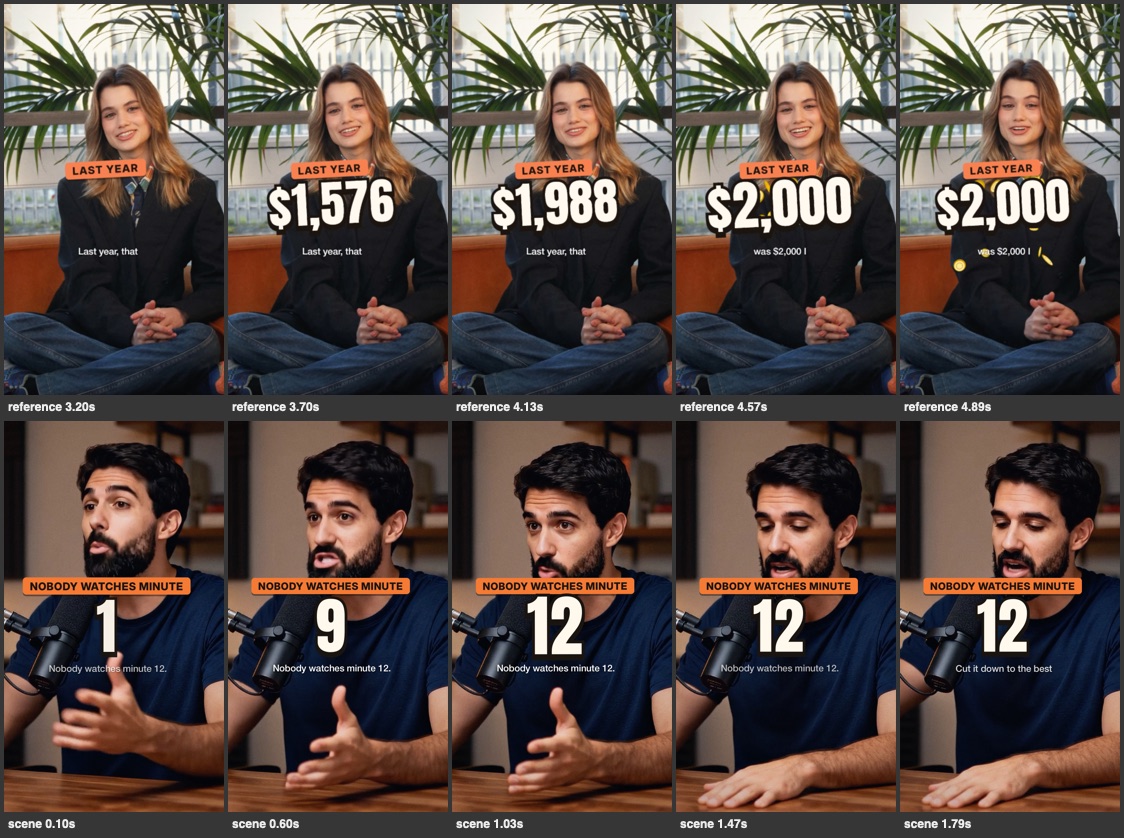
Sample footage, made with AI. The motion is ReelCut’s, exactly as exported.
Features
Everything a reel needs. Just ask.
No menus to learn. Each of these is one sentence to ChatGPT or Claude, and runs right on your Mac.
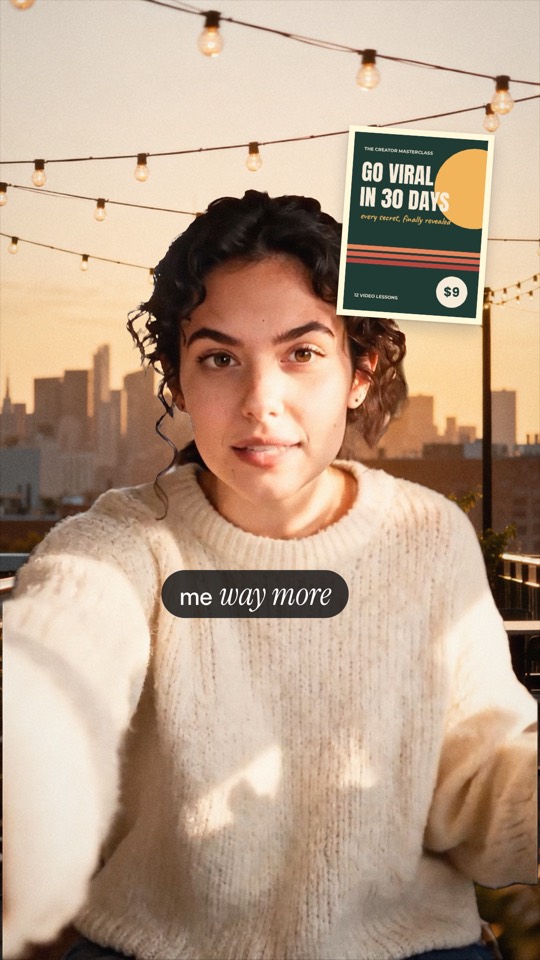
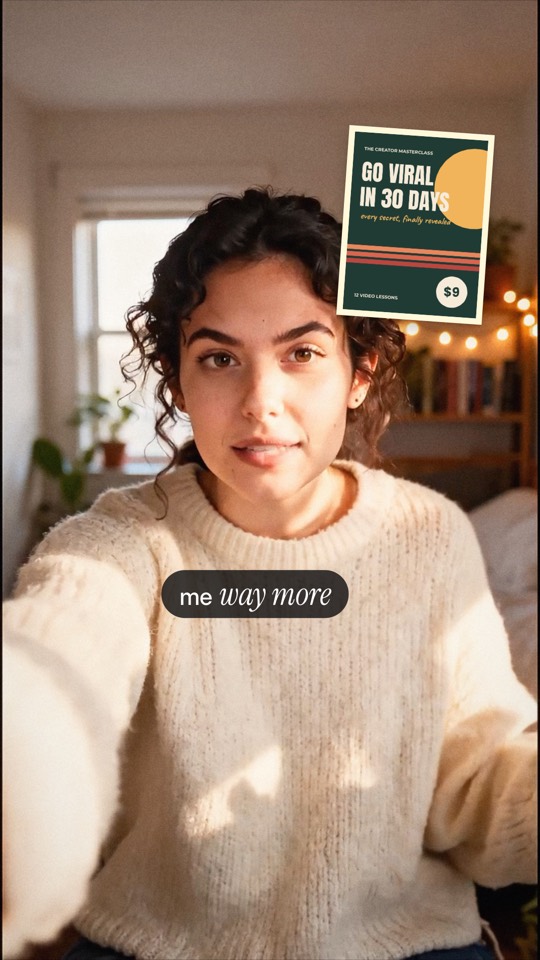
Background removal, video and pictures
Blur it, make it a clean colour, or stand in front of any picture. Done on your Mac, frame by frame, with no green screen.
 Opening A
 Opening B
 Opening C
Hook tests for trial reels
Three openings of the same reel. Post them as Instagram trial reels, which go to non-followers first, and keep the one that holds people.
115 original sounds
Ten collections, from memes and reactions to transitions and 8-bit, made from scratch in code for ReelCut. Each lands on the word you pick and stays there when the cut changes. All of them are included. Tap to hear.
All 21, one per genre
21 original music tracks
One for each genre creators use most, made for ReelCut with Lyria, Google’s music AI. Music sits under your voice and dips while you talk. All 21 are included. Tap a track to hear it.
Trending sounds. See what’s trending on TikTok in your niche. ReelCut times your hook to the song, which you add when you post, or lays a track in the same vibe under your reel instead.

Thumbnails and covers
From your own footage: you, cut out with a white outline, a chunky title that reads at phone size, and a pill label or two.
- ✓Talks in the first second
- ✓Hook text on screen
- ✓Captions clear of the buttons
- ✓9:16 at 1080 × 1920
- ✓Voice at −14 LUFS
- ✓No dead air at the end
- ✓Caption and hashtags written
The ready-to-post check
Every export is checked first: the hook, captions clear of the buttons, loudness, length, and the caption you’ll paste.
Before
After
Clean voice, right loudness
On-device voice isolation takes out fans, traffic and echo, and every export plays at the level Instagram expects.
Timeline
NewEvery layer, in your hands.
ChatGPT or Claude does the edit. Every title, sound, scene and cut it makes sits on the timeline, where you can move it yourself.

A lane for every layer
Motion, text, video, your voice, sound effects and music. Only the lanes in use show, and each one folds away.
Click to change it
A block opens in the inspector: change its words or volume, play from it, or take it out.
It snaps to your words
Drag a title or sound and it lands on the nearest word you said, so it stays in sync when the cut changes. Drag an edge to trim; ⌫ deletes.
Your AI sees it
Every change you make by hand can be undone with ⌘Z, and ChatGPT or Claude sees it the next time it looks.
Long videos
One talk. A week of reels.
Drop in a podcast, a stream or a long talk to camera, and get back a stack of reels, each with its own hook and ready for its own day. This 1:19 talk became five.
The talk · 1:19 · one take
Five reels by ReelCut, in one saved look
- Finds the moments worth posting: a story with a payoff, a sharp claim, a clear tip
- Gives each one its own hook and a real ending
- Your captions and style on every reel, then exports them all at once
Landscape too
Framed on whoever’s talking.
Shot wide for YouTube? ReelCut finds the speaker’s face in every frame and cuts a vertical reel around it.
Night-desk tones, a marker title and a hand-drawn circle on the number.
YouTube
Long videos too. Same chat.
Ask ChatGPT or Claude to edit your YouTube video and get a clean 16:9 cut in full HD, with everything YouTube Studio asks for.
- Retakes, dead air and rambling out; the story kept in order
- Chapters timed from the edit, added to your description
- A subtitles file YouTube shows as captions
- A title, a description and a thumbnail, ready to paste
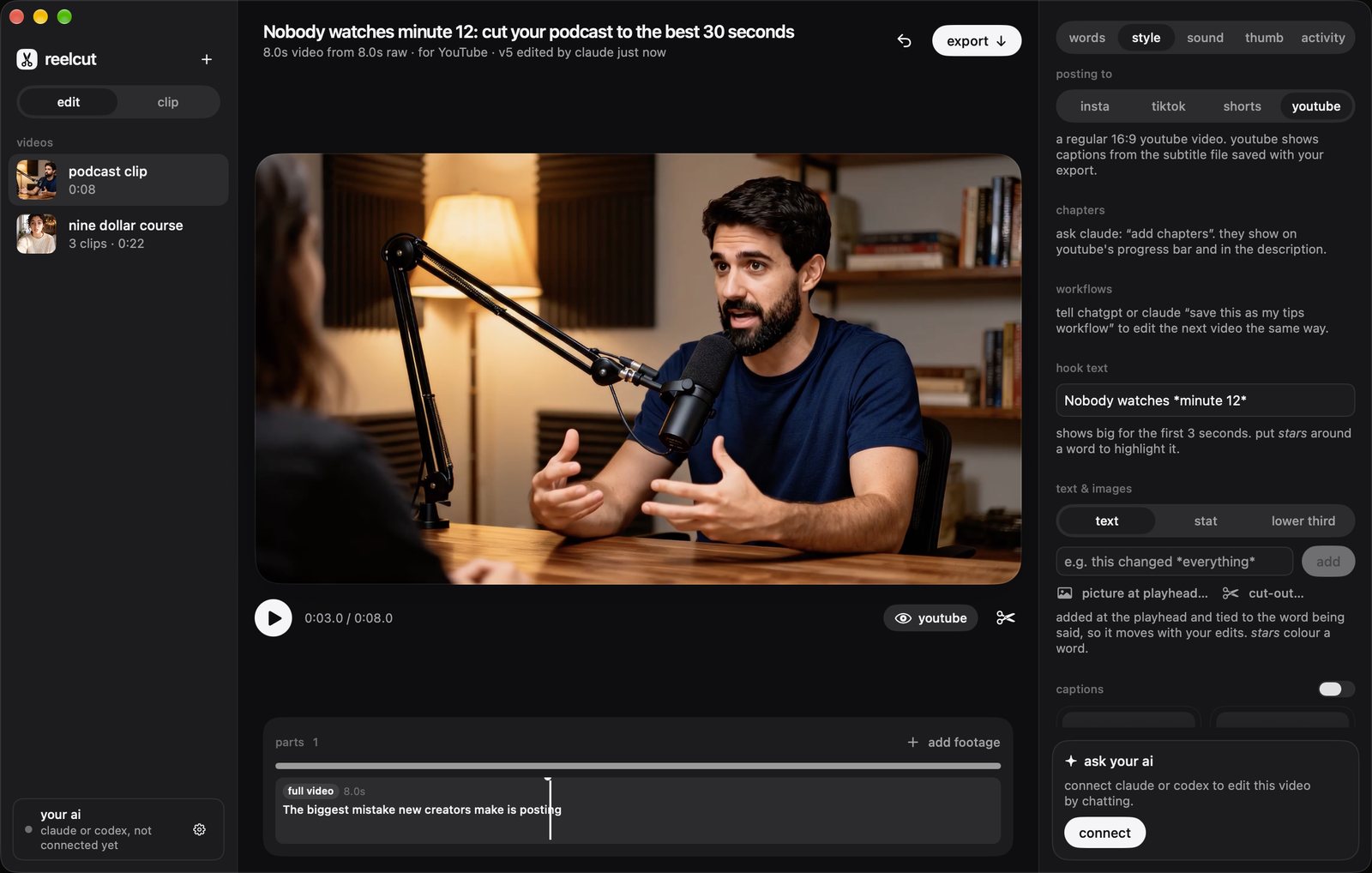
Sample footage, made with AI. The edits are ReelCut’s, exactly as exported.
Workflows
NewEdit once. Then just say “like last time.”
Post the same kind of video every week? Save an edit you love as a workflow. It keeps your look and the steps you asked for, so the next video takes one message instead of ten, and uses less of your ChatGPT or Claude limit.
- “save this as my tips workflow”: that’s all it takes
- Pick one when you drop new clips in, or name it in the chat
- Lock your brand kit, your fonts and colours, and ChatGPT or Claude can’t drift from it
tips
every new videoTalking-head tips, 30–45 s
- 1Open on the boldest claim
- 2Cut restarts and tangents
- 3A cha-ching on every price
- 4A text card for the key tip
edit today’s 3 clips with my tips workflow
Done: three reels with your look, each opening on its boldest line, with a cha-ching on every price.
Privacy
Your footage never leaves your Mac.
No uploading, no waiting for a server, no files that expire. Here’s exactly what happens where.
On your Mac
- Your video files, always
- Transcription
- Voice clean-up and background removal
- Looks, marks and words behind you
- Rendering and export
What your AI sees
- The transcript of what you said
- A few small stills, to check framing
- Through your own ChatGPT or Claude account
Optional AI extras, like fixing a word in your own voice, show their price before they run, and send only what they need, only when you say yes. Editing never needs them.
- caption styles
- 32caption styles
- film looks
- 5film looks
- sound effects
- 115sound effects
- music tracks
- 21music tracks
- days free, nothing locked
- 7days free, nothing locked
What’s new
Shipping every week
- Oct 12A layered timeline: move any title, sound or scene by hand
- Oct 12Motion design: kinetic type, phones, charts, maps and collage, timed to your words
- Oct 12Copy the motion style of a video you love
- Oct 10Nine new caption styles, like cinema, magazine and lyric
- Oct 10115 original sound effects in ten collections
- Oct 1021 original music tracks, one for each genre
- Oct 10Trending TikTok sounds, with a track in the same vibe
- Oct 10Aesthetic edits: editorial captions, film looks, words behind you
- Oct 10Hand-drawn marks, labels, picture cards and emoji
- Oct 10Three looks to pick from, or match a reel you like
- Oct 10A brand kit ChatGPT or Claude can’t drift from
- Oct 10Creator-style thumbnails
- Oct 9Workflows: save an edit once, reuse it on the next video
- Oct 9Sign in on the website with ReelCut on your Mac
- Oct 8Edit from claude.ai and your phone through a private link
- Oct 8Import clips straight from Photos
- Oct 8Background removal for video and pictures, on your Mac
- Oct 8Hook tests for Instagram trial reels
Pricing
Free for 7 days. Then $5 once.
You bring the ChatGPT or Claude you already use, and your Mac does the work. Try everything for 7 days, with nothing locked. Then a lifetime licence keeps it yours, with every update. AI extras that run in the cloud are on credits.
- Editing by chatting with ChatGPT or Claude
- Captions, titles, looks, backdrop, marks and stickers
- Thumbnails, workflows and a brand kit
- YouTube edits, clipping and background removal
- All 32 caption styles
- All 5 film looks
- All 115 sound effects and 21 music tracks
- Trending sounds, with a track in the same vibe
- Full-quality export, no watermark
- Every update, for good
Post a reel, get it free. Show ReelCut with #reelcutapp, and at 2,000 views your licence is on us. How
Cloud AI extras, like cloud transcription, are on credits, with 200 to start.
Get early accessFAQ
Questions, answered.
What is ReelCut, exactly?
A Mac app that edits video, and lets ChatGPT or Claude drive it. You say what you want in the chat, your AI decides the edit, and ReelCut makes it on your Mac and plays it straight away. (Under the hood, ReelCut hands your AI its editing tools through MCP, the standard way AI apps connect to other apps.)
Do I need editing skills?
No. Tell ChatGPT or Claude what you want in your own words, like “shorter”, “start with the price” or “bigger captions”, and it makes the editing decisions. You never have to touch the timeline, but every cut, title and sound is on it if you want to move or trim one by hand.
Can it make aesthetic edits, like words behind me?
Yes. Ask for a look and ChatGPT or Claude shows you three to pick from, each with its own captions, title and colours, like warm film or night desk. It can put a big word behind you, draw circles, arrows and sparkles where you point, and add labels, picture cards and emoji. It’s all made on your Mac, with no paid caption service.
Can it add transitions and animations?
Yes. Ask for a whip pan, zoom, spin, glitch, flash, fade, blur or shake between your clips, and ChatGPT or Claude adds it, usually with a matching whoosh. On screen, numbers count up, titles land as you say them, captions pop word by word and circles draw themselves on. It all renders on your Mac.
Can it make animations like big YouTubers?
Yes. Ask ChatGPT or Claude for real motion design, like a number that slams in as you say it, you or your app in a phone, a chart, a map of your trip or a paper collage, and it designs the scene and times it to your words. It can fill the screen, split it with you, put you in a window, sit beside you or go behind you. Show it a video you love and it copies the style, never the video’s footage, words, music or logos. Your Mac renders it all.
Which AI do I need?
One of them: Claude on any plan, free included, in the Claude app (Claude Code works too), or ChatGPT Plus or higher, through OpenAI’s Codex app. It does the thinking; ReelCut does the cutting, captions and rendering on your Mac.
What else do I need?
macOS 26 or later on Apple silicon, and Claude on any plan or ChatGPT Plus or higher.
How much does it cost?
It’s free for 7 days, with nothing locked: captions, titles, transitions, looks, thumbnails, background removal and export, with all 32 caption styles, all 115 sound effects, all 21 music tracks and trending sounds. Then a lifetime licence is one payment, with every update: $5 for the first 100 sales, then $9, then $19 (₹299, ₹499 and ₹999 in India). There’s no subscription. It works on one Mac at a time, and you can move it to a new Mac anytime.
What happens when the trial ends?
ReelCut pauses until you get a licence. You can still open it, browse your projects and watch your edits, but it won’t make new edits or exports. Nothing is deleted, and buying unpauses it at once.
Can I get it free?
Yes: post an original Reel, TikTok, Short or X video that shows ReelCut, with #reelcutapp in the caption. When it reaches 2,000 views, paste the link in ReelCut or on the website, and your licence is free. If you already bought it, we refund you and you keep it.
What are credits?
Credits pay only for AI extras that run in the cloud, like cloud transcription in any language, with or without a licence. Every extra shows its price first, and you get 200 free to start.
Will there be more AI features?
Yes. We add more AI extras in coming updates, and they use the same credits. Each one shows its price before it runs, and editing never needs them.
Does my video get uploaded anywhere?
No. Transcription, voice clean-up, background removal and rendering all happen on your Mac, and ReelCut never uploads your videos to edit them.
What does the AI see?
The transcript of your clips and a few small stills, so it can pick the hook and see where your face is. It doesn’t get the video files, and it all goes through your own ChatGPT or Claude account.
Can I undo an edit?
Yes. Every change is a new version you can step back from with ⌘Z, and your AI never overwrites a change you made by hand.
Can I use trending songs?
Yes: add them in TikTok or Instagram when you post, because the platforms license those songs there. ReelCut also shows what’s trending on TikTok and can put an original track in the same vibe under your reel instead.
Are ReelCut’s sounds and music safe to post?
The 115 sound effects are made from scratch in code, with no samples, and the 21 music tracks were made for ReelCut with Lyria, Google’s music AI, so you can use any of them in your videos, sponsored ones included.
Are the fonts and emoji okay to use in posted videos?
Yes. The fonts ReelCut bundles for captions, titles and thumbnails are open-licensed (SIL Open Font License or Apache 2.0), and its emoji are Microsoft’s Fluent emoji, under the MIT licence. Both are fine in videos you post, sponsored ones included.
Which languages does it understand?
English, Hindi and Hinglish (with captions in English letters), and more than 40 others, all transcribed on your Mac.
Does it post for me?
You post from your phone or YouTube Studio, so you can add a trending sound and pick your cover. ReelCut writes the caption, hashtags, title and description, and makes the cover or thumbnail.
Make your first reel tonight.
Free for 7 days, then one payment and it’s yours. Your footage stays on your Mac, and ChatGPT or Claude does the editing with you.
macOS 26 or later on Apple silicon, and Claude on any plan or ChatGPT Plus or higher